
IOS SQLite数据库
简介
9、为上述文本字段创建IBOutlets
学习链接:
在IOS中使用Sqlite来处理数据。如果你已经了解了SQL,那你可以很容易的掌握SQLite数据库的操作。
实例步骤
1、创建一个简单的View based application
2、选择项目文件,然后选择目标,添加libsqlite3.dylib库到选择框架
3、通过选择" File-> New -> File... -> "选择 Objective C class 创建新文件,单击下一步
4、"sub class of"为NSObject",类命名为DBManager
5、选择创建
6、更新DBManager.h,如下所示
#import <Foundation/Foundation.h>
#import <sqlite3.h>
@interface DBManager : NSObject
{
NSString *databasePath;
}
+(DBManager*)getSharedInstance;
-(BOOL)createDB;
-(BOOL)saveData:(NSString*)registerNumber name:(NSString*)name
department:(NSString*)department year:(NSString*)year;
-(NSArray*) findByRegisterNumber:(NSString*)registerNumber;
@end
7、更新DBManager.m,如下所示
#import "DBManager.h"
static DBManager *sharedInstance = nil;
static sqlite3 *database = nil;
static sqlite3_stmt *statement = nil;
@implementation DBManager
+(DBManager*)getSharedInstance{
if (!sharedInstance) {
sharedInstance = [[super allocWithZone:NULL]init];
[sharedInstance createDB];
}
return sharedInstance;
}
-(BOOL)createDB{
NSString *docsDir;
NSArray *dirPaths;
// Get the documents directory
dirPaths = NSSearchPathForDirectoriesInDomains
(NSDocumentDirectory, NSUserDomainMask, YES);
docsDir = dirPaths[0];
// Build the path to the database file
databasePath = [[NSString alloc] initWithString:
[docsDir stringByAppendingPathComponent: @"student.db"]];
BOOL isSuccess = YES;
NSFileManager *filemgr = [NSFileManager defaultManager];
if ([filemgr fileExistsAtPath: databasePath ] == NO)
{
const char *dbpath = [databasePath UTF8String];
if (sqlite3_open(dbpath, &database) == SQLITE_OK)
{
char *errMsg;
const char *sql_stmt =
"create table if not exists studentsDetail (regno integer
primary key, name text, department text, year text)";
if (sqlite3_exec(database, sql_stmt, NULL, NULL, &errMsg)
!= SQLITE_OK)
{
isSuccess = NO;
NSLog(@"Failed to create table");
sqlite3_close(database);
return isSuccess
; }
else
{
isSuccess = NO;
NSLog(@"Failed to open/create database");
}
}
return isSuccess;}
- (BOOL) saveData:(NSString*)registerNumber name:(NSString*)name
department:(NSString*)department year:(NSString*)year;
{
const char *dbpath = [databasePath UTF8String];
if (sqlite3_open(dbpath, &database) == SQLITE_OK)
{
NSString *insertSQL = [NSString stringWithFormat:@"insert into
studentsDetail (regno,name, department, year) values
(\"%d\",\"%@\", \"%@\", \"%@\")",[registerNumber integerValue],
name, department, year];
const char *insert_stmt = [insertSQL UTF8String];
sqlite3_prepare_v2(database, insert_stmt,-1, &statement, NULL);
if (sqlite3_step(statement) == SQLITE_DONE)
{
return YES;
}
else
{
return NO;
}
sqlite3_reset(statement);
}
return NO;
}
- (NSArray*) findByRegisterNumber:(NSString*)registerNumber{
const char *dbpath = [databasePath UTF8String];
if (sqlite3_open(dbpath, &database) == SQLITE_OK)
{
NSString *querySQL = [NSString stringWithFormat:
@"select name, department, year from studentsDetail where
regno=\"%@\"",registerNumber];
const char *query_stmt = [querySQL UTF8String];
NSMutableArray *resultArray = [[NSMutableArray alloc]init];
if (sqlite3_prepare_v2(database,
query_stmt, -1, &statement, NULL) == SQLITE_OK)
{
if (sqlite3_step(statement) == SQLITE_ROW)
{
NSString *name = [[NSString alloc] initWithUTF8String:
(const char *) sqlite3_column_text(statement, 0)];
[resultArray addObject:name];
NSString *department = [[NSString alloc] initWithUTF8String:
(const char *) sqlite3_column_text(statement, 1)];
[resultArray addObject:department]; NSString *year = [[NSString alloc]initWithUTF8String: (const char *) sqlite3_column_text(statement, 2)];
[resultArray addObject:year];
return resultArray;
}
else
{
NSLog(@"Not found");
return nil;
}
sqlite3_reset(statement);
}
}
return nil;
}
8、如图所示,更新ViewController.xib文件
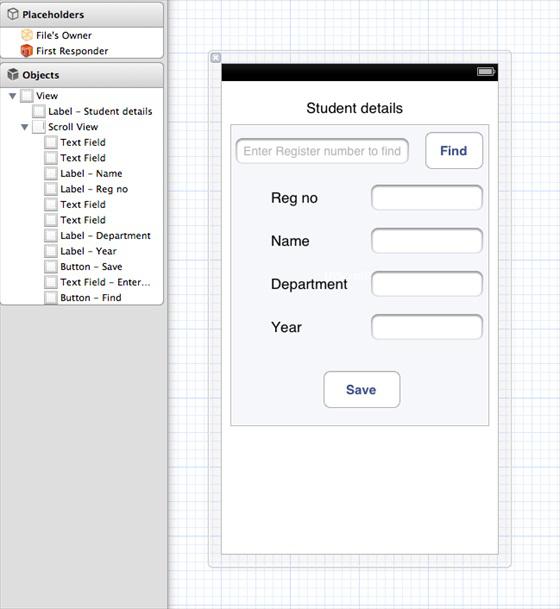
10、为上述按钮创建IBAction
11、如下所示,更新ViewController.h
#import <UIKit/UIKit.h>
#import "DBManager.h"
@interface ViewController : UIViewController<UITextFieldDelegate>
{
IBOutlet UITextField *regNoTextField;
IBOutlet UITextField *nameTextField;
IBOutlet UITextField *departmentTextField;
IBOutlet UITextField *yearTextField;
IBOutlet UITextField *findByRegisterNumberTextField;
IBOutlet UIScrollView *myScrollView;
}
-(IBAction)saveData:(id)sender;
-(IBAction)findData:(id)sender;
@end
12、更新ViewController.m,如下所示
#import "ViewController.h"
@interface ViewController ()
@end
@implementation ViewController
- (id)initWithNibName:(NSString *)nibNameOrNil bundle:(NSBundle *)
nibBundleOrNil
{
self = [super initWithNibName:nibNameOrNil bundle:nibBundleOrNil];
if (self) {
// Custom initialization
}
return self;
}
- (void)viewDidLoad{
[super viewDidLoad];
// Do any additional setup after loading the view from its nib.}
- (void)didReceiveMemoryWarning
{
[super didReceiveMemoryWarning];
// Dispose of any resources that can be recreated.}
-(IBAction)saveData:(id)sender{
BOOL success = NO;
NSString *alertString = @"
Data Insertion failed";
if (regNoTextField.text.length>0 &&nameTextField.text.length>0 &&
departmentTextField.text.length>0 &&yearTextField.text.length>0 ) { success = [[DBManager getSharedInstance]saveData: regNoTextField.text name:nameTextField.text department:
departmentTextField.text year:yearTextField.text];
}
else{
alertString = @"Enter all fields";
}
if (success == NO)
{
UIAlertView *alert = [[UIAlertView alloc]initWithTitle:
alertString message:nil
delegate:nil cancelButtonTitle:@"OK" otherButtonTitles:nil];
[alert show];
}
}
-(IBAction)findData:(id)sender
{
NSArray *data = [[DBManager getSharedInstance]findByRegisterNumber:
findByRegisterNumberTextField.text];
if (data == nil)
{
UIAlertView *alert = [[UIAlertView alloc]initWithTitle:
@"Data not found" message:nil delegate:nil cancelButtonTitle:
@"OK" otherButtonTitles:nil];
[alert show];
regNoTextField.text = @"";
nameTextField.text =@"";
departmentTextField.text = @"";
yearTextField.text =@"";
}
else
{
regNoTextField.text = findByRegisterNumberTextField.text;
nameTextField.text =[data objectAtIndex:0];
departmentTextField.text = [data objectAtIndex:1];
yearTextField.text =[data objectAtIndex:2];
}
}a
#pragma mark
- Text field delegate-(void)textFieldDidBeginEditing:(UITextField *)textField
{
[myScrollView setFrame:CGRectMake(10, 50, 300, 200)];
[myScrollView setContentSize:CGSizeMake(300, 350)];
}
-(void)textFieldDidEndEditing:(UITextField *)textField{
[myScrollView setFrame:CGRectMake(10, 50, 300, 350)];
}
-(BOOL) textFieldShouldReturn:(UITextField *)textField{
[textField resignFirstResponder];
return YES;
}
@end
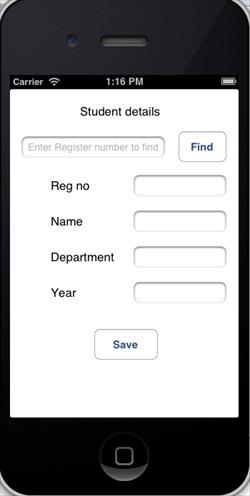
输出
现在当我们运行应用程序时,我们就会获得下面的输出,我们可以在其中添加及查找学生的详细信息
http://www.wyzc.com/ios/?tg=5009295340
学习交流群:317140762
